Can Relay Autobooker play a sound or alarm when it finds or books a load?
Features & Capabilities
Can Relay Autobooker play a sound or alarm when it finds or books a load?
Features & Capabilities
Yes. Relay Autobooker Cardamon plays a sound for six events: a load found, a booking starting, a load booked, a booking that failed, new loads on the board, and the Relay Assistant chat opening. Each event has its own sound and volume, and any of them can keep ringing as an alarm until you stop it. Sounds are part of the free plan.
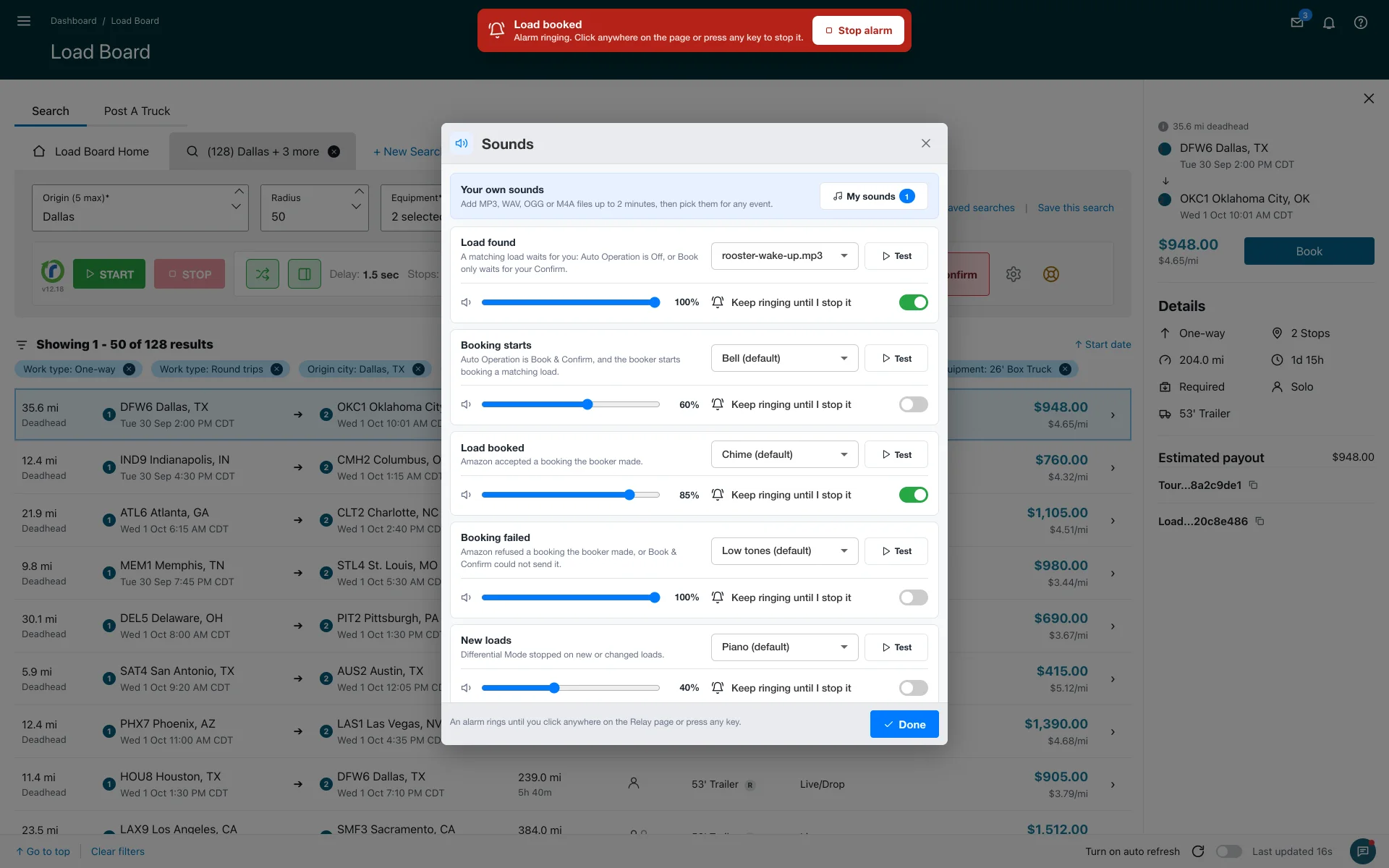
Where the settings are
Open Settings, find Sounds in Refresh Settings and press Sound settings. The window lists the six events. For each one you pick a sound, press Test to hear it, set the volume from 0 to 100 percent, and decide whether it should keep ringing.
- Load found: Melody by default
- Booking starts: Bell
- Load booked: Chime
- Booking failed: Low tones
- New loads: Piano
- Relay Assistant chat: Beeps
The built-in sounds are Bell, Melody, Piano, Beeps, Chime, Low tones and Alarm clock, plus "No sound" for events you want silent.
The alarm that keeps ringing
Turn on "Keep ringing until I stop it" for an event and the sound repeats until you act. A red bar appears at the top of the page that reads "Alarm ringing. Click anywhere on the page or press any key to stop it", with a Stop alarm button. Drivers use it on "Load found" or "Load booked" so a booking in the night does not pass unnoticed.
Your own sounds
Under My sounds you can upload up to 12 files of your own, each up to 2 minutes and 3 MB, in MP3, WAV, OGG or M4A. An uploaded file appears in every event's sound picker.
Two details worth knowing: a booking you make by hand stays silent, and the "New loads" sound works in the free Smart Refresher as well as in Premium. The Sounds window arrived in version 12.17.
More about features & capabilities
- What is Smart Refresher Mode (FREE tier)?
- What is 'Auto Operations' mode?
- How does 'Stop on New Loads' mode work?
- How does 'Stop on Payout Change' mode work?
- What is Fast Confirm (AUTO CONFIRM)?
- How do Load filters work?
Last updated October 14, 2026. See what changed in the changes history.
Need Help?
Contact our support team at support@cardamon.org