What are Booking Strategies (Regular, Fast, Super Fast)?
Features & Capabilities
What are Booking Strategies (Regular, Fast, Super Fast)?
Features & Capabilities
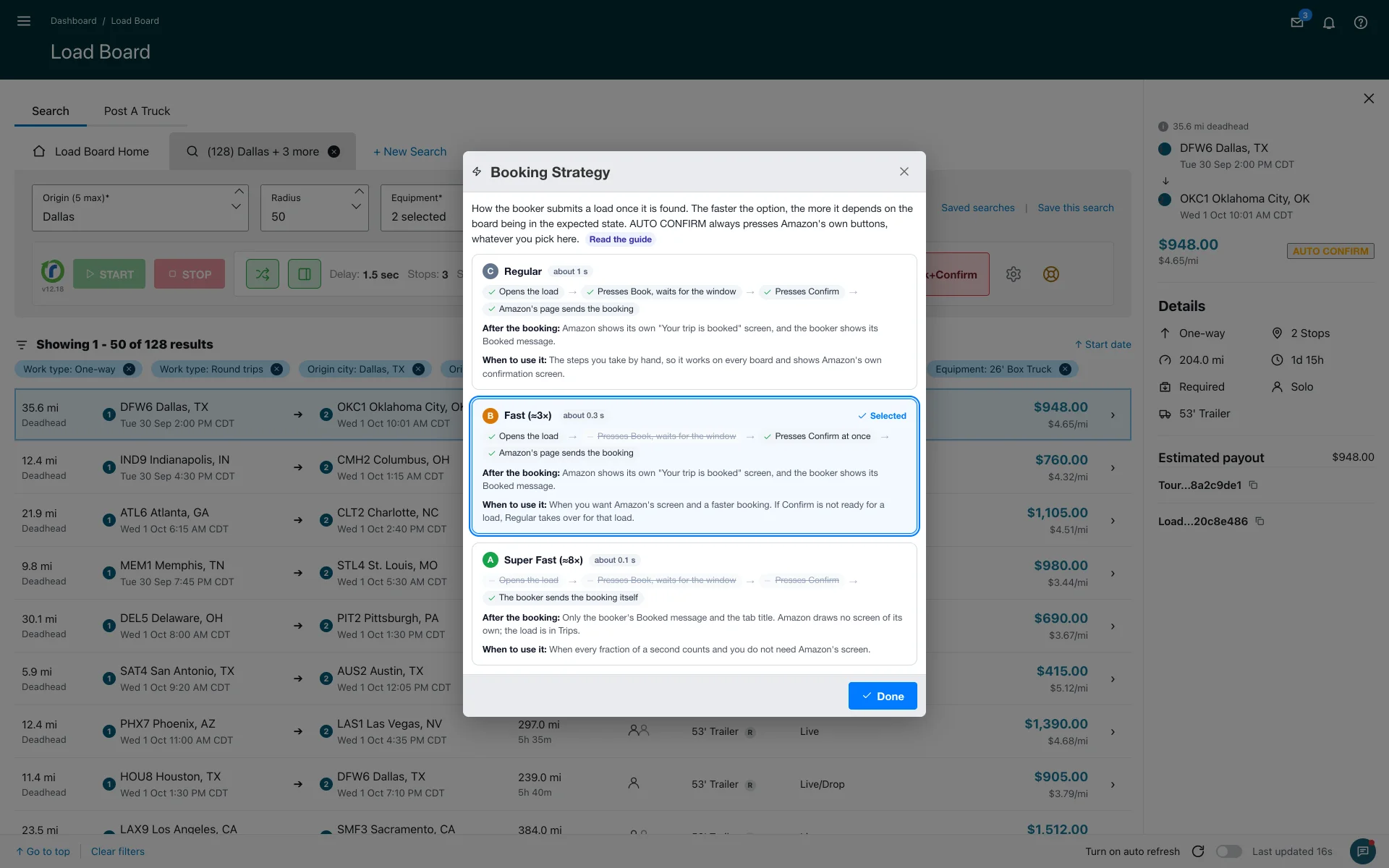
Booking Strategy sets how Relay Autobooker Cardamon sends a booking once it finds a load that passes your filters. Regular takes about 1 second and presses Amazon's Book and Confirm buttons, Fast takes about 0.3 seconds and presses Confirm at once, and Super Fast takes about 0.1 seconds and sends the booking itself.
Where to choose it
Open Settings and click Booking Strategy in the Auto Booking section. Since version 12.12 it opens its own small window with the three options one under the other. Each option lists the four steps of a booking, strikes through the ones it skips, and shows how long it takes and what you see after the booking. Click an option to choose it.
The four steps
A booking by hand has four steps. Each strategy takes some of them and skips the rest.
- Open the load
- Press Book and wait for the confirmation window
- Press Confirm
- Amazon's page sends the booking
Regular, about 1 second
Takes all four steps, the same ones you take by hand, so it works on every board. After the booking Amazon shows its own "Your trip is booked" screen and the booker shows its Booked message. Start here until you trust your filters.
Fast, about 0.3 seconds
Opens the load and presses Confirm at once, without pressing Book and waiting for the window. Amazon's page still sends the booking, so you get Amazon's "Your trip is booked" screen and the Booked message. If Confirm is not ready for a load, Regular takes over for that load.
Super Fast, about 0.1 seconds
Skips the first three steps. The booker sends the booking itself without opening the load. Amazon draws no screen of its own, so your confirmation comes from the booker: the "Load booked" message with the trip id, the green Booked chip on the card, the disabled Booked button in the panel and the tab title. The load is in Trips. Pick it when every fraction of a second counts and you do not need Amazon's screen.
Speed against certainty
Each step the booker skips is a check it no longer makes. The faster the option, the more it depends on the board being in the expected state. Regular is the most stable. Fast is about three times quicker and falls back to Regular per load when it has to. Super Fast is about eight times quicker than Regular and never opens the load.
AUTO CONFIRM ignores the strategy. The strategy applies to automatic Book + Confirm only. When you click the orange AUTO CONFIRM button yourself, or press its shortcut, the booker presses Amazon's own Book and Confirm buttons whatever strategy you chose. See Fast Confirm.
What you see after each one: Regular and Fast show Amazon's screen plus the booker's own Booked signals. Super Fast shows the booker's signals only. What happens after a load is booked walks through the message, the chip and the Booked button.
Which one to pick
- New to the booker: Regular. Check that Max Stops, Stem Time and your Load filters skip the right loads before you speed up.
- Busy board, and you want Amazon's screen: Fast.
- Loads vanish in under a second on your lanes: Super Fast, and trust the Booked chip and message.
More about features & capabilities
- What is Smart Refresher Mode (FREE tier)?
- What is 'Auto Operations' mode?
- How does 'Stop on New Loads' mode work?
- How does 'Stop on Payout Change' mode work?
- What is Fast Confirm (AUTO CONFIRM)?
- How do Load filters work?
Last updated September 17, 2026. See what changed in the changes history.
Need Help?
Contact our support team at support@cardamon.org