What do the "What changed?" and "Skipped" chips mean?
Features & Capabilities
What do the "What changed?" and "Skipped" chips mean?
Features & Capabilities
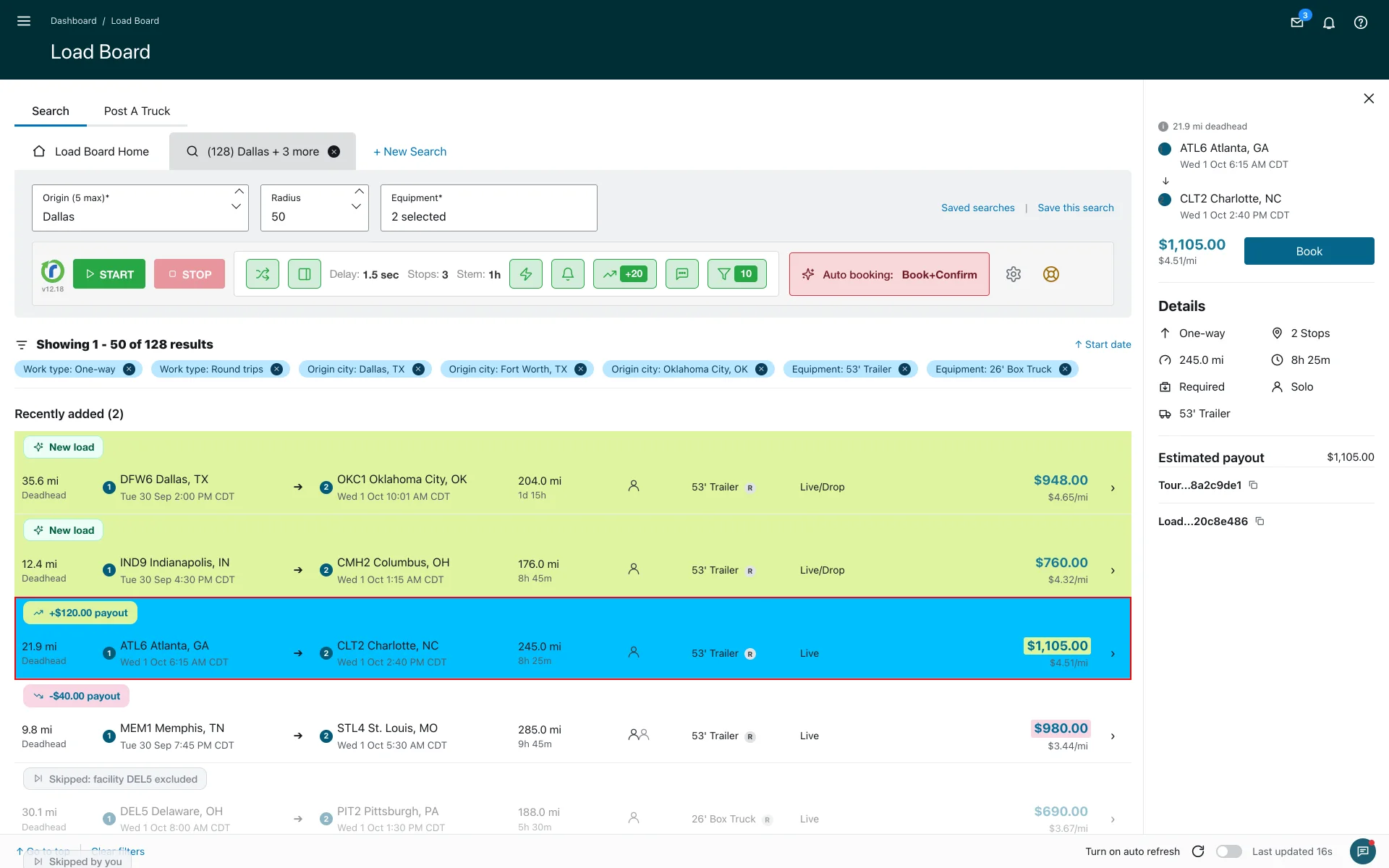
Chips are small labels Relay Autobooker Cardamon adds to loads on the Amazon Relay board so you can see, at a glance, what changed and why a load was passed over. There are two families of chips:
1. "What changed?" chips
When the extension flags a load, a chip explains what it spotted. Colors mirror Amazon's own highlight so they look native:
- Green chip: the payout increased on an existing load.
- Red-tinted chip: the payout decreased.
- Sparkle chip: a brand-new load appeared on the board.
2. "Skipped" chips
- "Skipped: …": a flagged load didn't match one of your filters, and the chip names the exact rule that blocked it, for example "Skipped: stops > 2", "Skipped: stem < 45m", or "Skipped: payout < 20". This works in regular mode too: any load your filters skip gets a chip.
- "Skipped by you": a muted tag that appears when you press Start again without booking a flagged load, so you can see what you've already passed on. It resets when you change filters or reload.
Behind the chips: payout-change detection uses a short-memory cache with a 5-minute freshness window, so the extension stops on real increases even after a Start/Stop cycle and won't fire on stale ones. It also marks the whole matching card with a thin red outline and a sky-blue background so you can spot it fast.
More about features & capabilities
- What is Smart Refresher Mode (FREE tier)?
- What is 'Auto Operations' mode?
- How does 'Stop on New Loads' mode work?
- How does 'Stop on Payout Change' mode work?
- What is Fast Confirm (AUTO CONFIRM)?
- How do Load filters work?
Last updated June 11, 2026. See what changed in the changes history.
Need Help?
Contact our support team at support@cardamon.org