 UTM Builder by Cardamon
Tag this page.
Build the whole campaign.
Create GA4 campaign URLs beside the page you are working on. Keep everyday links free, then use Pro to turn a destination list into a checked campaign CSV.
Chrome Web Store release in preparation
Campaign data stays on your device. No account needed for link building.
Compare free and Pro features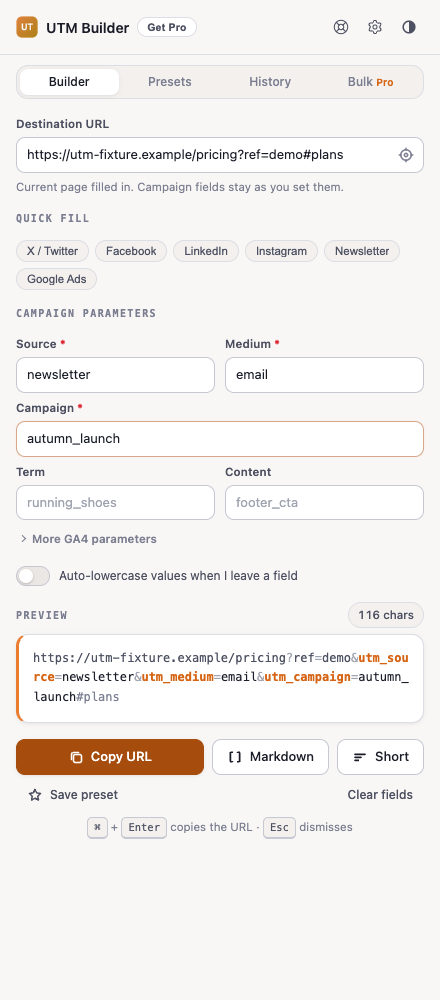
From a page to a ready-to-share link
- Open the side panel
The current website URL fills automatically. Switch pages to follow your work, or edit the destination to keep it fixed.
- Add campaign details
Choose source, medium and campaign. Check naming warnings, use a saved preset, and review the final URL.
- Copy or build in bulk
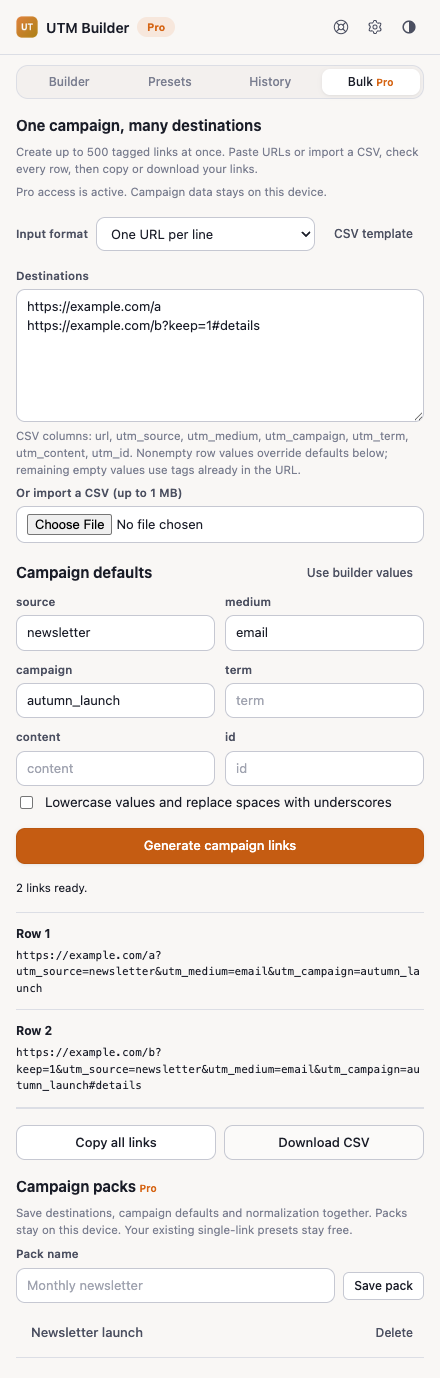
Copy one link for free. With Pro, paste up to 500 destinations or import a CSV and check every row before export.
Free for individual links. Pro for campaign batches.
Presets, local history and history CSV import/export remain free. Pro adds two new workflows.
| Feature | Free | Pro |
|---|---|---|
| Current-page URL and individual link builder | Included | Included |
| Naming checks, quick fills and saved presets | Included | Included |
| Local history and history CSV import/export | Included | Included |
| Up to 500 destinations per batch with row validation | — | Included |
| Bulk copy and campaign CSV download | — | Included |
| Reusable campaign packs (up to 30) | — | Included |
Pro pricing is shown in the extension before purchase. Checkout is hosted by Cardamon and processed by Paddle; activate with your Cardamon license key.
Purchases will be offered with the public extension release. No download or checkout is available from this page yet.
Check the batch before it leaves your browser
Every destination is checked for a valid website URL and the required campaign fields. Invalid rows block export, while naming and duplicate warnings remain visible.
Campaign packs save the destination list, defaults and normalization setting together. Reuse a pack for the next newsletter or promotion without rebuilding the setup. Up to 30 packs are stored on this device.
Questions before you install
Does it send my campaign URLs to a server?
No. URLs, UTM values, CSV files, history and campaign packs are processed locally. Cardamon service requests handle pricing, licenses, review configuration and support; they do not include your campaign data unless you choose to include it in a support message.
Why does Chrome ask for access to tab information?
The tabs permission lets the open side panel read the active website URL, including when you switch tabs. The extension has no content scripts or website host permissions and does not read page content.
Will changing tabs erase my work?
A destination filled from the current page follows tab changes. A URL you edit or paste is kept until you use the current-page button. Campaign fields remain as you set them.
Is this a link shortener or analytics dashboard?
No. UTM Builder creates direct campaign URLs without redirects. It does not track clicks or display Google Analytics reports.
How does the CSV choose campaign values?
Nonempty row values take precedence over campaign defaults. Any remaining empty value uses the matching UTM tag already in that row’s URL. Unrelated query parameters and fragments are retained.
Version 1.1.0 · Updated 2026-09-17