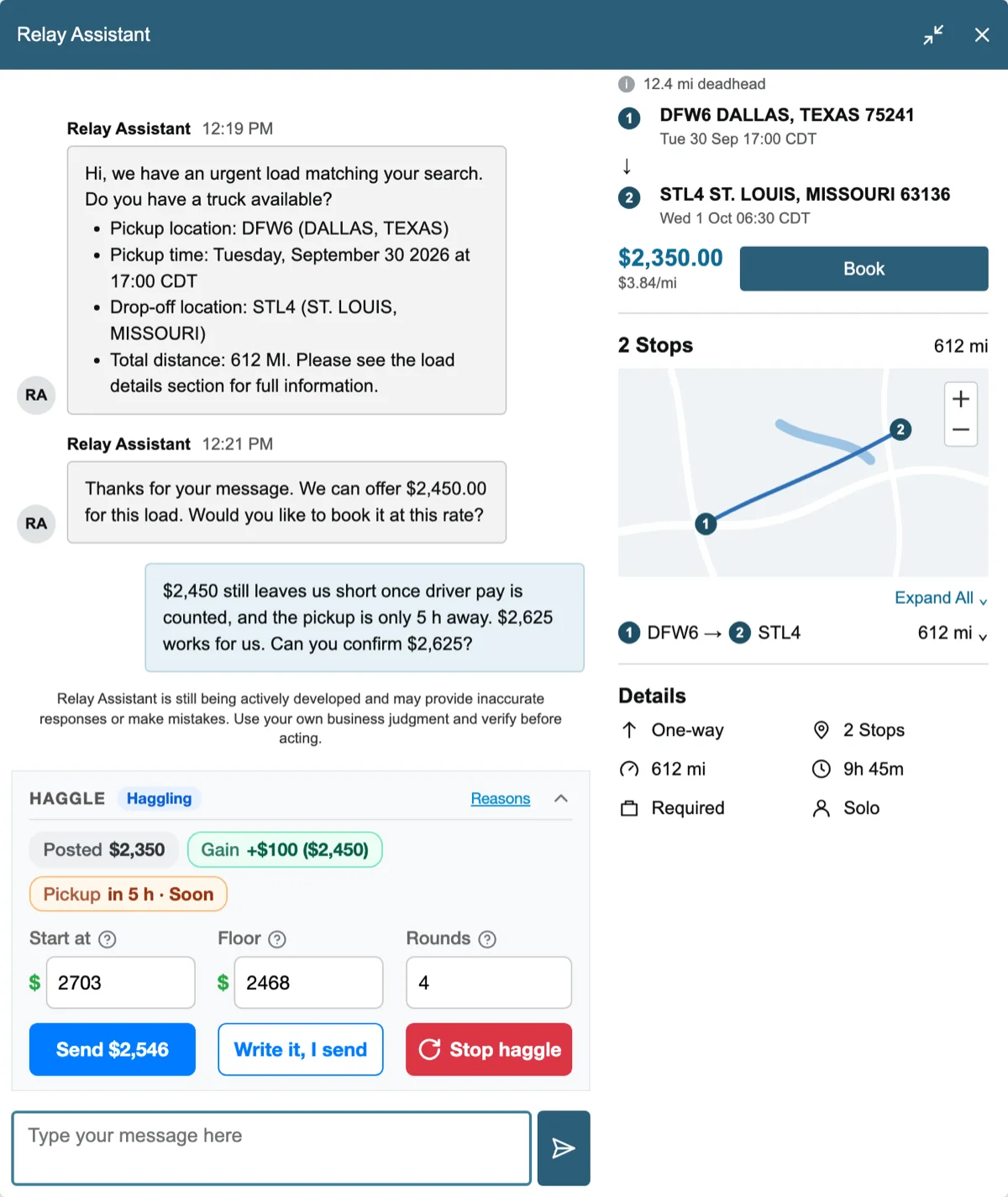
A Haggle card in the Relay Assistant chat shows the posted rate, the gain offered so far and the pickup time, and sends a counter-offer written from the load's facts. Start haggle, or the Auto haggle for me switch, counters on its own from a start amount down to your floor and stops at a deal for you to book.
- Haggle. The booker negotiates a load's rate in the Relay Assistant chat for you, from your start amount down to your floor, and leaves the booking to you.
- A Haggle card in the chat. When the Relay Assistant chat opens on a load, a card appears right above the chat box with the facts a negotiation needs: the posted rate, the gain Amazon has offered so far, and how soon the pickup is. Send counter sends the next counter of your plan and names it on the button, the Start at amount first: the booker writes a short message from the load's own facts, the distance, the stops, the pickup time and the lane's costs. "Write it, I send" puts the message in the chat box for you to edit first. The arrow in the card's corner folds it to two lines, the numbers with the pickup, then the status with Send and Start haggle, and every chat opens it the way you left it.
- No two counters read alike. Each message draws its opener, two reasons and its ask from lists, so the Assistant never sees the same text twice. The reasons are a list you own: Reasons, a window opened from Settings or from the card, shows the ten built-in lines, fuel, tolls, driver pay, the empty run, stops, distance, a pickup that is close, and lets you edit them, delete them and add your own. A line can use the load's facts as placeholders, {distance}, {stops}, {pickup}, {unit}, {posted} and {offer}, and a line whose fact the load does not have is skipped. Within one chat every reason is used once before any repeats.
- Start haggle, or Auto haggle for me. Press Start haggle on the card and the booker haggles on its own: it counters once per answer, from a start amount down to a floor, and stops when Amazon's offer reaches the floor. Switch on Auto haggle for me in the quick panel or Settings and the booker haggles in every chat it opens: its first counter is the request, so the Auto Request text is off meanwhile and the two never mix. A chat you open yourself never haggles on its own. Start and floor are percentages above the posted rate, 15 and 5 to begin with; the card shows the amounts for each load and lets you change them for that chat. Up to four counters by default, six at most.
- A deal is yours to book, and it sounds like one. The booker never presses Book for a haggled rate, and nothing on the card locks after a deal: counter again, or raise the floor and haggle on. When the offer reaches your floor, the card shows Deal, a toast names the offer, and a new sound plays, a cash register's ka-ching, and the chat waits for you: press Book, or AUTO CONFIRM. Set "Haggle deal" to keep ringing in Sounds and a deal at night wakes you. When the rounds run out without a deal, "Haggle without a deal" plays a sad trombone instead.
- Your words win. Type anything in the chat while the haggle runs and it steps back at once; press Start haggle to continue, or Stop haggle to end it. One counter per answer, after a short pause, the way a person negotiates.
- Several boards at once. A Relay tab behind the others shows in its title what the booker is doing there, and its first sound plays while you work in another tab.
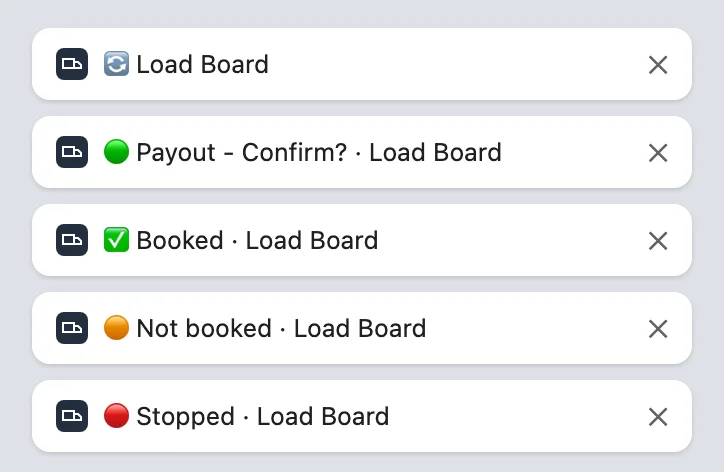
- The tab tells you what the booker does. Each Relay tab's title starts with a mark you can read in the tab strip, so with ten boards open you see which tab needs you without opening any.
- 🔄 The booker is refreshing.
- 🟢 It found something for you: a load, new loads, a payout increase, the Relay Assistant chat or a haggle deal. "Booking" follows while Book & Confirm books it, and "Confirm?" when Book only has pressed Book, as in 🟢 Payout - Confirm?
- ✅ The load is booked.
- 🟠 The booking did not go through.
- 🔴 A problem stopped the booker.
- Background tabs ring the first time too. Chrome held a Relay tab's first sound until you opened the tab, so with several boards open, a load found in a tab behind the others stayed silent until you clicked it. Each Relay tab now plays a muted, silent clip while you are in it, at the latest when you press Start, and after that Chrome plays its sounds while you work in another tab.
- The tab tells you what the booker does. Each Relay tab's title starts with a mark you can read in the tab strip, so with ten boards open you see which tab needs you without opening any.
- Sounds windows move and resize. Sounds, My sounds and Haggle reasons move by their header and resize by the corner, like Settings, and remember where you left them. A sound's list now opens over the window, above its button when there is no room below, so the last events in the list show every choice.
Read more about this feature
The answers below describe how the feature works today, in version 12.20.
 Get from Chrome Store